Home
About
Search
🌐
English Română
  • PHP as a general-purpose language

    Citește postarea în română

    May 8, 2010 CLI PHP PHP-GTK Winbinder
    Share on:

    PHP for desktop, is it worth it?

    PHP is described on Wikipedia as:

    PHP: Hypertext Preprocessor is a widely used, general-purpose scripting language that was originally designed for web development to produce dynamic web pages.

    Taking this into consideration, apps divide in 3 category: web, command line and desktop.

    For the Web, PHP is the most popular open-source (and not only) programming language.

    PHP CLI

    PHP CLI (Command Line Interface) I find it very interesting, even though is not used at it’s full potential. A lot of developers prefer shell scripting or Perl with no real reason. I’ve been playing around with this tool and I liked the result.

    Important frameworks like: Zend, Symfony or Cake PHP are using PHP CLI to generate projects, models, CRUD or other features that can be easily used with a command line.

    In the Windows environment the command line is not exactly popular, but in Linux is almost imperative. After all what’s the point of using shell scripting when you can use a powerful language with a lot of features like PHP?

    But CLI is not limited just to the command line, it is usually used for cronjobs, pipes, socket-servers etc.

    PHP-GTK

    When it comes to PHP and desktop usually people thing about PHP-GTK. What do I thing about the project? Is not dead, like it says on the official website, but is not exactly alive. The reason? Gtk is not exactly simple. If you come from the Linux environment probably is not that difficult, but if you usually work on the web is not exactly html… Nevertheless there is a community that keep this project alive.

    Nevertheless, it allows developers to build desktop apps in PHP, compatible with a wide variety of operating systems.

    But there is an issue, the resulting apps are not exactly compiled code, they must run using a PHP virtual machine. Here is the issue, how do you distribute the app? If you have a small app of only few lines of code, to distribute it with a virtual machine is a little complicated… Also the code is visible, of course there are methods to solve this issue, but there aren’t exactly simple.

    This is probabily the most popular PHP platform for desktop, if you can say that about this environment.

    The documentation is pretty big, it was taken from the C++ version. Is not as well polished like the PHP manual for instance, but I believe is sufficient.

    Winbinder

    Compared to PHP-GTK it has an disadvantage, it only works on MS Widows operating system. The advantage is that it has a much simpler API. If I had to choose a PHP platform for desktop, probably I would go for Winbinder. Unfortunately is in the same state, is not dead but is not exactly alive. It also have the support of a community, but without any particular special results.

    The issue with the compiled code is found here also, and even more the issue with platform distribution is just as bad. I firmly believe that if you want to develop an app using this platform, to make it work on your computer is the easiest part, to make it work on someone else’s computer is the real issue…

    The documentation is pretty small, because of the API. But simplicity is good when it comes to programming, that means you can easily build pretty interesting apps.

    Compilers

    There a few, and the majority of them have some issue because they use old PHP versions of even old GTK. I’ve spend many hours on Google trying to find some reals solution but with no success.

    Most popular compilers:

    • Bambalam – works well with CLI and Winbinder. But it has a great disadvantage: it’s only compatible with PHP 4.4.4, and I believe that says it all. Anyway I believe it was the most interesting solution, unfortunately to old (the last version was released in 2006).
    • PriadoBlender – works well with PHP-GTK and CLI, but is not very stable. The last (beta) version was released in 2007, and since then nothing new was ever heard from it. Probably if that version would be updated  it would help a lot the PHP-GTK project.

    Conclusion

    When it comes to Web, everything is great!

    PHP as a command line tool is ever more popular and more tools appear each day!

    In the desktop environment is a “the living dead” sensation… This projects are not dead but there not exactly alive. Of course there are other solution for PHP on desktop which I did not mention, but there are in about the same state. Probably a new approach would help, something more attractive for web developers and those passionate about this language.

  • Factory method pattern using PHP 5.3 and late static bindings

    Citește postarea în română

    Jan 24, 2010 Design patterns PHP php5 php5.3
    Share on:

    Factory method design pattern introduced by GoF (Gang of Four) which I’ve talked about in a previous blog, has the base idea of a method that generates objects. Most implementations are “poor”, because they use a lot of hard-coding for the factory (just like me in the previous blog).

    PHP 5.3 offers the possibility of a very interesting implementation using “Late static bindings“.

    The classes from which the objects will be generated are:

     1// abstract base class that will be inherited
     2abstract class Drink {
     3
     4    // ingredients
     5    protected $ingredients;
     6
     7    // public method for producing the drink
     8    abstract public function MakeDrink();
     9}
    10
    11// a child class for tea
    12class Tea_Drink extends Drink {
    13
    14    // ingredients for tea
    15    protected $ingredients = array('tea', 'sugar', 'mink', 'water');
    16
    17    // make tea
    18    public function MakeDrink() {
    19
    20        // make tea
    21    }
    22}
    23
    24// another class for Bloody Mary
    25class BloodyMary_Drink extends Drink {
    26
    27    // ingredients for Bloody Mary
    28    protected $ingredients = array('votka', 'salt', 'tomato juice');
    29
    30    // make Bloody Mary
    31    public function MakeDrink() {
    32
    33        // make BloodyMary
    34
    35    }
    36}
    

    The idea is to have an abstract factory class to extend as simple as possible when creating each new factory class.

    PHP 5

    In PHP 5 the class will look something like this:

     1// abstract Factory class
     2abstract class absFactory {
     3
     4    // name of the base class
     5    static protected $base_class = '';
     6
     7    // factory method
     8    public static function getInstance($type) {
     9
    10        // name of the resulting class
    11        $class_name = $type . '_' . self::$base_class;
    12
    13        // check if class exists
    14        // here you can add an autoloader
    15        if(!class_exists($class_name)) {
    16            throw new Exception( 'Class ' . $class_name . ' not loaded!');
    17        }
    18
    19        // check to see if the class inherits the base class
    20        if(!is_subclass_of($class_name, self::$base_class)) {
    21            throw new Exception(
    22                'Class ' . $class_name . ' is not a child of ' . self::$base_class
    23            );
    24        }
    25
    26        // new object
    27        return new $class_name;
    28
    29    }
    30
    31}
    

    Because the getInstance() method is static the property will be static too.

    If we try:

     1class DrinkFactory extends absFactory {
     2
     3    static protected $base_class = 'Drink';
     4}
     5
     6try {
     7
     8    $obj = DrinkFactory::getInstance('Tea');
     9
    10} catch (Exception $e) {
    11
    12    echo $e->getMessage();
    13}
    

    The output will be:

    1Class Tea_ not loaded!
    

    Because of the “self”, we can’t just call the method using the child class because the value of $base_class will be “” and not “Drink”, we must overwrite the getInstance() method. Which is quite “complicated”.

    A working version in PHP 5 will be:

     1class DrinkFactory extends absFactory {
     2
     3    public static function getInstance($type) {
     4
     5        self::$base_class = 'Drink';
     6
     7        // factory method of the base factory class
     8        parent::getInstance($type);
     9
    10    }
    11
    12}
    13
    14try {
    15
    16    $obj = DrinkFactory::getInstance('Tea');
    17
    18} catch (Exception $e) {
    19
    20    echo $e->getMessage();
    21}
    

    But is not exactly “elegant”.

    PHP 5.3

    Here we have “Late static bindings”, which is basically introducing the work “static”.

    The base factory class will look something like this:

     1// abstract Factory class
     2abstract class absFactory {
     3
     4    // name of the base class
     5    static protected $base_class = '';
     6
     7    // factory method
     8    public static function getInstance($type) {
     9
    10        // name of the resulting class
    11        $class_name = $type . '_' . static::$base_class;
    12
    13        // check if class exists
    14        // here you can add an autoloader
    15        if(!class_exists($class_name)) {
    16            throw new Exception( 'Class ' . $class_name . ' not loaded!');
    17        }
    18
    19        // check to see if the class inherits the base class
    20        if(!is_subclass_of($class_name, static::$base_class)) {
    21            throw new Exception(
    22                'Class ' . $class_name . ' is not a child of ' . static::$base_class
    23            );
    24        }
    25
    26        // new object
    27        return new $class_name;
    28
    29    }
    30
    31}
    

    A change so small allows us to create a much “nicer” factory class:

     1class DrinkFactory extends absFactory {
     2
     3     static protected $base_class = 'Drink';
     4
     5}
     6
     7try {
     8
     9    $obj = DrinkFactory::getInstance('Tea');
    10
    11} catch (Exception $e) {
    12
    13    echo $e->getMessage();
    14}
    

    Basically in this version only the relevant property in this context is overwritten.

  • Factory method design patten in PHP

    Citește postarea în română

    Jan 23, 2010 Design patterns PHP
    Share on:

    An creational design pattern, which represents an solution for generation objects without specifying the class name. Virtually all methods that generate objects are particular implementations of the Factory Method pattern.

    Motivation:

    A motivation for this choice is that the creation of the object is delegated to the factory method.

    Diagram:
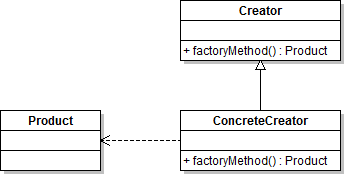
    factory method pattern

    Implementation:
    The classes that generates the objects, the common class to extend and the class with the factory method:

      1// the common class to be extended
      2abstract class OutputBase {
      3     // output the necessary headers
      4     abstract public function header();
      5
      6     // resulting body
      7     abstract public function body($data);
      8
      9}
     10
     11// class for XML ouput
     12class XMLOutput extends OutputBase {
     13
     14     // output XML header
     15     public function header() {
     16          header('content-type: text/xml');
     17     }
     18
     19     // xml document
     20     public function body($data) {
     21          $res = '';
     22
     23          $res .= '';
     24
     25          foreach ($data as $root => $item) {
     26
     27               $res .= '';
     28
     29               foreach ($item as $key => $val) {
     30                    $res .= '<'.$key.'>'.$val.'';
     31               }
     32
     33               $res .= '';
     34          }
     35
     36          $res .= '';
     37
     38          return $res;
     39
     40     }
     41
     42}
     43
     44// class for CSV output
     45class CSVOutput extends OutputBase {
     46
     47     // output CSV header
     48     public function header() {
     49          header("Content-type: text/plain");
     50     }
     51
     52     // CSV body
     53     public function body($data) {
     54          $res = '';
     55
     56          $keys = array_keys($data[0]);
     57
     58          foreach ($keys as $key) {
     59               $res .= '"'.$key.'";';
     60          }
     61          $res .= "\r\n";
     62
     63          foreach ($data as $item) {
     64               foreach ($item as $val) {
     65                    $res .= '"'.$val.'";';
     66               }
     67
     68               $res .= "\r\n";
     69          }
     70
     71          return $res;
     72     }
     73}
     74
     75// the factory method class
     76// is abstract so it wont be instantiated
     77abstract class OutputFactory {
     78
     79     // constant for XML type
     80     const XML = 1;
     81
     82     // constant for CSV type
     83     const CSV = 2;
     84
     85     // static factory method
     86     public static function getInstance($type) {
     87          // depending which constant was received as a parameter
     88          // one of the objects will be returned
     89          switch ($type) {
     90               case self::XML :
     91                    return new XMLOutput();
     92               break;
     93
     94               case self::CSV :
     95                    return new CSVOutput();
     96               break;
     97          }
     98
     99          // if the value received as a parameter is not one of the constants
    100          // an exception will be thrown
    101          throw new Exception('Invalid class type!');
    102     }
    103
    104}
    

    Example:

     1// the data
     2$data = array(
     3               array(
     4                    'a' => 1,
     5                    'b' => 2,
     6                    'c' => 3
     7                    ),
     8               array(
     9                    'a' => 4,
    10                    'b' => 5,
    11                    'c' => 6
    12                    )
    13          );
    14
    15// try-catch block in case of an exception
    16try {
    17     // generation the object
    18     $obj = OutputFactory::getInstance(OutputFactory::XML);
    19
    20     // output headers
    21     $obj->header();
    22
    23     // display body
    24     echo $obj->body($data);
    25
    26} catch (Exception $e) {
    27
    28     $e->getMessage();
    29
    30}
    
  • CodeIgniter 1.7 Packt Publishing – Book review part 1

    Citește postarea în română

    Dec 9, 2009 CodeIgniter PHP
    Share on:

    1847199488

    CodeIgniter is an open-source PHP framework, build for RAD development. This framework is continuously growing in popularity, probably especially since people realized that is much easier to use an open-source framework instead of developing an internal one, but that’s another story. The CodeIgniter 1.7 book from PacktPublishing, written by Jose Argudo Blanco and David Upton is building a big picture about the CodeIgniter 1.7 framework, as an addition to the reference manual.

    After all every respectable framework has an detailed reference, with usability examples, more or less comprehensible. When it comes to learning an framework (and not only), an reference is usually not the best place to start from, because is hard to get the big picture when you can only receive atomic answers. That’s why we buy books this days, to have a general image with problems and solutions. And this is where the CodeIgniter 1.7 book comes in.

    Initially, when I’ve seen that the title has the version number of the analyzed framework I was a little pessimistic, because usually when you buy a book you don’t want it to be tight up to particular version, isn’t it? Well, not exactly… I had a similar issue with Zend Framework, most books use “older versions”  (ex: 1.5-1.6) and I wanted to see an approach using the new features from version 1.8 or greater. After all when you start learning something you usually want the latest version of the framework or what ever it is that you are learning, and when new features appear it will be much easier to simply look then in the reference guide since you already know the basics.

    This book seams to start from the beginners level and progressively describe both basic elements as well as the most common problems the user may encounter when developing apps using the CodeIgniter framework.  The sample chapter, looks pretty well structured and easy to understand, and from the table of contents it seams to approach all the important subjects. With the hope that the rest of the book will be just as well structured (I’m actually judging a book by the cover?) and a second part to this review will follow I can’t barely wait for the book.

    To be continued…

  • Singleton pattern in PHP

    Citește postarea în română

    Oct 10, 2009 Design patterns PHP Singleton
    Share on:

    Probably the most popular pattern form PHP and not only.

    Motivation:

    Restriction to a single instance of a resource across the app, accessible from anywhere.

    Diagram:
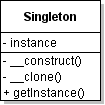
    singleton

    Implementation:

    The classic example for PHP is the database resource. The database connection must be unique across the app, not to establish multiple connections to the database and as a consequence resources to be wasted.

    For a single instance to exist the constructor must only be accessible from a static method, and the resulting object must not have the posibillity to be cloned. Also the class must not be extensible.

    Example:

      1// db connection information
      2define ( 'DB_HOST', 'localhost' );
      3define ( 'DB_USER', 'user' );
      4define ( 'DB_PASS', 'pass' );
      5define ( 'DB_DATABASE', 'db' );
      6
      7/**
      8 * Singleton class for database connection management using mysqli
      9 */
     10final class SingletonDB {
     11
     12     /**
     13      * Singleton instance
     14      *
     15      * @var SingletonDB
     16      */
     17     protected static $_instance = null;
     18
     19     /**
     20      * Connection resource
     21      *
     22      * @var resource
     23      */
     24     protected $_connection = null;
     25
     26     /**
     27      * Constructor which also connects to the database
     28      *
     29      */
     30     protected function __construct() {
     31          // connection to database server
     32          $this->_connection = new mysqli ( DB_HOST, DB_USER, DB_PASS );
     33
     34          // in case of an error connection an exception is thrown
     35          if ($this->_connection->connect_error) {
     36               throw new Exception ( 'Error connection to mysql server' );
     37          }
     38
     39          // selecting the database
     40          $this->_connection->select_db ( DB_DATABASE );
     41
     42          // in case of an error selecting the database an exception is thrown
     43          if ($this->_connection->error) {
     44               throw new Exception ( 'Error selecting database' );
     45          }
     46
     47     }
     48
     49     /**
     50      * Run SQL queries
     51      *
     52      * @param string $query SQL query
     53      * @return mysqli_result
     54      */
     55     public function query($query) {
     56          return $this->_connection->query ( $query );
     57     }
     58
     59     /**
     60      * Access for error messages
     61      *
     62      * @return string
     63      */
     64     public function error() {
     65          return $this->_connection->error;
     66     }
     67
     68     /**
     69      * Method that is called when cloning an object
     70      * Is protected so is not possible to clone the object
     71      *
     72      */
     73     protected function __clone() {
     74     }
     75
     76     /**
     77      * Close connection and destroy the object
     78      *
     79      */
     80     public function __destruct() {
     81          $this->_connection->close ();
     82     }
     83
     84     /**
     85      * Method that returns an SingletonDB instance
     86      *
     87      * @return SingletonDB
     88      */
     89     public static function getInstance() {
     90          if (self::$_instance == null) {
     91               self::$_instance = new SingletonDB ( );
     92          }
     93
     94          return self::$_instance;
     95     }
     96}
     97
     98try {
     99     // SingletonDB instance
    100     $db = SingletonDB::getInstance ();
    101
    102     // Query to be run
    103     $q = 'SELECT * FROM test';
    104
    105     // the query will return an mysqli_result object
    106     $result = $db->query ( $q );
    107
    108     // check for errors and display them
    109     if ($db->error ()) {
    110
    111          echo $db->error ();
    112
    113     } else {
    114          // extract the result and display
    115          while ( $row = $result->fetch_assoc () ) {
    116               var_dump ( $row );
    117          }
    118          // close mysqli_result object
    119          $result->close ();
    120     }
    121// in case of exception there is displayed
    122} catch ( Exception $e ) {
    123     echo $e->getMessage ();
    124}
    
    • ««
    • «
    • 4
    • 5
    • 6
    • 7
    • 8
    • »
    • »»

Claudiu Perșoiu

Programming, technology and more
Read More

Recent Posts

  • 30 years of PHP
  • HTTPS certificate monitoring in Home Assistant
  • Adding a slider to Tasmota using BerryScript
  • The future proof project
  • Docker inside wsl2
  • Moving away from Wordpress
  • Custom path for Composer cache
  • Magento2 and the ugly truth

PHP 50 MISCELLANEOUS 47 JAVASCRIPT 14 MAGENTO 7 MYSQL 7 BROWSERS 6 DESIGN PATTERNS 5 HOME AUTOMATION 3 LINUX-UNIX 2 WEB STUFF 2 GO 1

PHP 36 JAVASCRIPT 15 PHP5.3 11 MAGENTO 7 PHP6 7 MYSQL 6 PHP5.4 6 ZCE 6 CERTIFICARE 5 CERTIFICATION 5 CLOSURES 4 DESIGN PATTERNS 4 HACK 4 ANDROID 3
All tags
3D1 ADOBE AIR2 ANDROID3 ANGULAR1 ANONYMOUS FUNCTIONS3 BERRYSCRIPT1 BOOK1 BROWSER2 CARTE1 CERTIFICARE5 CERTIFICATION5 CERTIFIED1 CERTIFIED DEVELOPER1 CHALLENGE1 CHM1 CLASS1 CLI2 CLOSURES4 CODE QUALITY1 CODEIGNITER3 COFFEESCRIPT1 COLLECTIONS1 COMPOSER1 CSS1 DEBUG1 DESIGN PATTERNS4 DEVELOPER1 DEVELOPMENT TIME1 DOCKER2 DOCKER-COMPOSE1 DOUGLAS CROCKFORD2 ELEPHPANT2 FACEBOOK2 FFI1 FINALLY1 FIREFOX3 GAMES1 GENERATOR1 GO1 GOOGLE1 GOOGLE CHROME1 GOOGLE MAPS1 HACK4 HOMEASSISTANT3 HTML2 HTML HELP WORKSHOP1 HTML51 HUG1 HUGO1 INFORMATION_SCHEMA1 INI1 INTERNET EXPLORER3 IPV41 IPV61 ITERATOR2 JAVASCRIPT15 JQUERY1 LAMBDA1 LINUX1 MAGENTO7 MAGENTO22 MAP1 MINESWEEPER1 MOTIVATION1 MYSQL6 NGINX1 NODE.JS2 NOSQL1 OBSERVER3 OBSERVER PATTERN1 OOP1 OPERA1 OPTIMIZATION1 ORACLE1 PAGESPEED1 PAIR1 PARSE_INI_FILE1 PHONEGAP2 PHP36 PHP ELEPHANT2 PHP FOR ANDROID1 PHP-GTK1 PHP42 PHP53 PHP5.311 PHP5.46 PHP5.53 PHP5.61 PHP67 PHP7.41 PROGRAMMING1 REVIEW1 ROMANIAN STEMMER2 SAFARY1 SCALAR TYPE HINTING1 SCHEME1 SET1 SHOPPING CART PRICE RULE1 SINGLETON1 SOAP1 SPL2 SQLITE1 SSH1 STACK TRACE1 STDERR1 STDIN1 STDOUT1 SUN1 SYMFONY2 TASMOTA1 TEST TO SPEECH1 TITANIUM2 TRAITS1 TTS1 UBUNTU1 UNICODE2 UTF-82 VECTOR1 WEBKIT1 WINBINDER1 WINDOWS2 WORDPRESS1 WSL21 YAHOO3 YAHOO MAPS1 YAHOO OPEN HACK1 YSLOW1 YUI1 ZCE6 ZCE5.31 ZEND3 ZEND FRAMEWORK3
[A~Z][0~9]

Copyright © 2008 - 2025 CLAUDIU PERȘOIU'S BLOG. All Rights Reserved