-
Along with globalization, the old ASCII code is no longer suitable. Consider that one day you have to develop a project in German, Russian or even Japanese, you could adapt the charset for each of these languages or you could simply develop using Unicode.
To use Unicode with MySQL UTF-8 can be used.
You must note that UTF-8 characters are variable in length and they are ASCII compatible. In ASCII 1 char = 1B, in UTF-8 1 char can be between 1 and 4 B.
UTF-8 charset and collation on the server
Character type in MySQL is dictated by charset.
To check if UTF-8 in installed on the server:
1SHOW CHARSET LIKE 'utf8';or with information_schema
1SELECT * FROM `CHARACTER_SETS` WHERE CHARACTER_SET_NAME = 'utf8';If the charset was found then we can continue.
Another element that appears with charset is collation, which it’s used for comparing strings at ordering.
To see what collations are available on the server:
1SHOW COLLATION WHERE CHARSET = 'utf8';or with information_schema
1SELECT * FROM `COLLATIONS` WHERE CHARACTER_SET_NAME = 'utf8';Collation are usually by language, for comparing strings with or without diacritics for example, or “bin” can be used with orders strings in binary mode, ie “A” is greater than “a” for example.
If no collation is specified, then the default one will be used.
UTF-8 and data bases
When creating a database you can specify the default charset to be used with all new tables for which there isn’t any charset specified.
For example:
1CREATE DATABASE db_name CHARACTER SET utf8 COLLATE utf8_romanian_ci;Or for modifying the default charset for a data base which already exists:
1ALTER DATABASE db_name CHARACTER SET utf8 COLLATE utf8_romanian_ci;UTF-8, tables and columns
For modifying tables which already exist ALTER TABLE must be used is used.
A table can have a default charset and collation, and each column can have it’s own charset and collation.
For more information about the table:
1SHOW CREATE TABLE tab;To set a charset for an existing table:
1ALTER TABLE tab CHARSET = utf8 COLLATE = utf8_romanian_ci;For modifying the charset of a VARCHAR(200) column is used:
1ALTER TABLE tab MODIFY c1 VARCHAR(200) CHARSET utf8 COLLATE utf8_romanian_ci;String size
A “problem” that may arise is related to the size of the character, it’s size can be between 1 and 4B. That is why for measuring a string column (like varchar) you must use CHAR_LENGTH(str) instead of LENGTH().
A short exemple:
1SET @var = 'aşadar'; 2SELECT CHAR_LENGTH(@var) AS 'Char', LENGTH(@var) AS 'Length'; 3 4// The output is: Char = 6 and Length = 7 because ş is 2B -
If your like me you prefer manuals in CHM format.
Unfortunately Zend Framework manual is only in .pdf and a little less obvious in HTML format.
Fortunately generating a format CHM manual is easy(really, it is).
The steps are:
-
Download and install HTML Help Workshop.
-
Download the Zend Framework manual in HTML format, the link is in bottom right, not very obvious I believe.
-
Open HTML Help Workshop.
-
File->Open and from the folder where the manual files are open htmlhelp.hhp
-
File->Complile
Done!
The compiled CHM manual is just few steps away!
-
-
Observer pattern refers to a class called “subject” that has a list of dependents, called observers, and notifies them automatically each time an action is taking place.
A small example of why is used:
– let’s say we have a class with does someting:
1class Actiune { 2 private $val; 3 function __construrct() { 4 // someting in the constructor 5 } 6 7 function change($val) { 8 $this->val = $val; 9 } 10}Each time $val changes we want to call a method of an “observer” object:
1class Actiune { 2 private $val; 3 function __construrct() { 4 // someting in the constructor 5 } 6 7 function change($val, $observator) { 8 $this->val = $val; 9 $observator->update($this); 10 } 11}Theoretically is not bad, but the more methods there are so does the dependence grows bigger and each time we add a new observer object we must modify the class, with will probably result in chaos, which will be almost impossible to port.
Now, the observator pattern looks something like this:
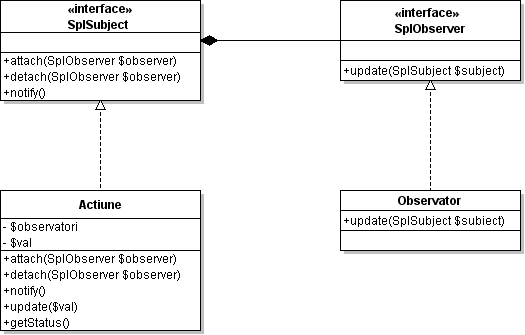
SPL (Standard PHP Library), which is well known for it’s defined iterators, comes with the interfaces SplSubject and SplObserver, for the subject and respectively the observer.
An implementation looks someting like this:
1/** 2 * the class which must be monitored 3 */ 4class Actiune implements SplSubject { 5 private $observatori = array(); 6 private $val; 7 8 /** 9 * method to attach an observer 10 * 11 * @param SplObserver $observator 12 */ 13 function attach(SplObserver $observator) { 14 $this->observatori[] = $observator; 15 } 16 17 /** 18 * method to detach an observer 19 * 20 * @param SplObserver $observator 21 */ 22 function detach(SplObserver $observator) { 23 $observatori = array(); 24 foreach($this->observatori as $observatorul) { 25 if($observatorul != $observator) $observatori[] = $observatorul; 26 } 27 $this->observatori = $observatori; 28 } 29 30 /** 31 * method that notifies the observer objects 32 */ 33 function notify() { 34 foreach($this->observatori as $observator) { 35 $observator->update($this); 36 } 37 } 38 39 /** 40 * method for makeing changes in the class 41 * 42 * @param int $val 43 */ 44 function update($val) { 45 echo 'updateing...'; 46 $this->val = $val; 47 $this->notify(); 48 } 49 50 /** 51 * public method with the subject's status 52 * 53 * @return int 54 */ 55 function getStatus() { 56 return $this->val; 57 } 58} 59 60/** 61 * and observer class 62 */ 63class Observator implements SplObserver { 64 function update(SplSubject $subiect) { 65 echo $subiect->getStatus(); 66 } 67} 68 69// an observer instance 70$observator = new Observator(); 71 72// an subject instance 73$subiect = new Actiune(); 74 75// attaching an observer to the subject 76$subiect->attach($observator); 77 78// update subject 79$subiect->update(5);What seems strange is that there isn’t any documentation on this SPL interfaces. Even on the Zend website there is an article PHP Patterns: The Observer Pattern which does not use SPL, but for something like namespaces there was documentation even before PHP 5.3 was out.
-
Today the JavaScript Games section is officially launched! The games have been recently created, after the model of classic games.
I’ve started the first game to show a friend that it is possible to build this kind of apps with JavaScript. And this is one of the main ideas of the section: interactivity in the browser using only HTML, CSS and of course JavaScript!
Today I make them public because is a shame to not give others the chance to waste time playing :).
The games should work cross-browser, they don’t have HTML 5 or other stuff that can lead to incompatibility. They shall prove the power of JavaScript, without any other sophisticated tools.
Many games are not well finished, but I hope that with time I’ll resolve the issues, add new features and of course new games. For suggestions and issues, please send an e-mail to claudiu@claudiupersoiu.ro.
Have fun!
-
Because I needed a Romanian stemmer at a point in time for Zend Search Lucene, and it seems that there aren’t any in PHP, I’ve made one.
The page is here, and comparing the resulting PHP class with a dictionary of the algorithm developed in snowball, after which this class was made, because I tried to make class work with or without diacritics, general error has increased by about 3%, but remaining below 5% for the whole dictionary of 22,570 words.
As a note, the class file should be opened with an UTF-8 editor, otherwise diacritics will disappear from the file.
Enjoy it!